Immersive Collage is my photo collage app for iPhone and iPad. Choose a layout and your photos, then adjust the result directly on the canvas: drag to refine a crop, pinch to zoom, swap photographs, and merge or split adjacent frames. It is for bringing several images into one composition while keeping the editing process close to the pictures.
View Immersive Collage on the App Store.
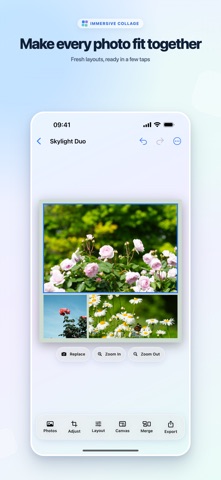
Screenshot from the app’s public App Store listing.
Begin with the story the photographs share
A useful collage usually has a reason for its images to sit together. They might show one afternoon, different views of the same place, or the details surrounding a portrait. Before editing, choose the image that should carry the most attention and the images that provide context.
For a travel collage, for instance, you could combine a wide view, a close detail, and a quieter scene. Use the layout to give each photograph a clear role. Matching every frame perfectly matters less than making the overall composition readable.
How to make a collage
- Pick a grid or a creative merged layout.
- Select your photographs.
- Drag within each frame to adjust its crop. Pinch to zoom or use precise adjustment controls.
- Press and drag to swap photographs if the sequence does not feel right.
- Refine spacing, outer margins, corner radius, and background.
- Save the result to Photos or share it through the system share sheet.
If the layout needs more than a different crop, merge or split adjacent frames. Undo and redo let you compare a change without committing to it immediately. You can also save favorite layouts and editing settings, then pin and reorder layouts you use often.
Choose the canvas before the final crop
The same collection of photographs can need different crops in a portrait canvas and a landscape canvas. Choose the intended format before making your last fine adjustments, especially when a face or a small subject sits close to an edge.
Immersive Collage includes photo, screen, paper, and print ratios. Custom ratios are a Pro feature. The ability to choose a paper-oriented canvas is useful when planning a print, but the final result also depends on source image resolution and the printer's scaling and border settings.
For physical prints, check the export and print preview before using a full batch of paper. A DPI label alone does not establish how much image detail a file contains; pixel dimensions and the intended physical size also matter.
What is free, and what needs Pro?
| Capability | Availability |
|---|---|
| Standard PNG export up to 2400 pixels on the long edge | Standard export |
| Custom rows and columns | Pro |
| Custom canvas ratios | Pro |
| High Quality lossless PNG export | Pro |
Pro is offered as a monthly subscription, an annual subscription, or a one-time lifetime purchase. A subscription trial is available to eligible App Store customers; eligibility and current prices are shown by the store. The public listing describes High Quality exports at 300 DPI or higher for supported print sizes.
Common questions
Can I move a photo without changing the whole layout? Yes. Drag within a frame to refine the crop, or swap images between frames to change their placement.
Are photos sent to a developer server? Selected photos are processed on the device for editing and export. The app requires no account and includes no ads, analytics SDKs, or developer-server uploads.
Which app should I use for one photograph? Immersive Border focuses on framing a single image. Collage is the choice when the relationship among multiple photos is the point.
Written by JustSong, the developer. Product details checked against the US App Store listing, version 1.0, on September 13, 2026. This guide does not describe unreleased export changes.