Immersive Words, listed on the App Store as 沉浸单词, is my iPhone vocabulary app for Chinese-speaking learners of English. Its cards combine an English word, phonetics, a Chinese definition, an English example, and a Chinese translation. The current interface and explanations are in Simplified Chinese, so this is specifically a guide for readers who can use that language.
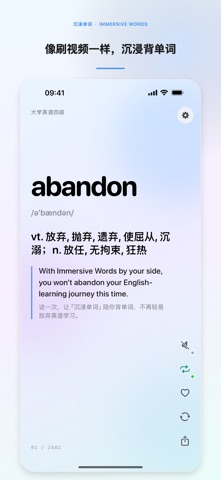
Screenshot from the app’s public App Store listing.
Who this app is for
If you use Chinese explanations while learning English, a bilingual card can keep the word and its context together. Immersive Words puts those elements on the same screen, with swipe navigation and system speech available when you want to hear the word and example.
The app can be relevant to Chinese-speaking students living abroad as well as learners studying at home. Your location is less important than whether Chinese definitions are useful to you. Someone seeking an English-only interface should be aware of the current language limitation before downloading.
Browse a word, then stay with its example
Swipe up or down to discover and revisit words along a random learning path. Swipe left or right to move in alphabetical order. The two paths let you alternate between exploration and looking around a familiar part of the vocabulary list.
A practical way to use a card is to read the English sentence first, check the Chinese explanation if needed, and then listen to the word and sentence. Before moving on, try making an example of your own. That last step is a suggested study habit, not an automatic assessment feature in the app.
The built-in speech uses iOS voices and reads the word followed by the English example. The app starts muted each time. Enhanced or high-quality English voices installed on the device can be selected, and the app provides installation guidance.
Review progress stays on the device
Learning progress, favorites, review stages, and the current position are saved locally. Due words are prioritized during later learning, with review intervals progressing through 1, 3, 7, 14, 30, and 60 days. The “meet again” action schedules the current word to reappear within a later stretch of browsing.
These features provide a return path to words you have encountered. They do not guarantee a test score or a particular retention rate. For exam preparation, vocabulary work still needs to sit alongside reading, listening, writing, and practice appropriate to your goals.
Vocabulary collections and their limits
The app includes vocabulary related to CET-4, CET-6, IELTS, and TOEFL. These are study collections, not official syllabuses issued by the exam organizers. The app is not affiliated with, sponsored by, or endorsed by those organizations.
Examples mainly use verifiable English–Chinese sentence pairs from Tatoeba. A sentence illustrates usage; it should not be mistaken for an official exam question.
Common questions
Does it teach English through an English-only interface? No. The current release uses Simplified Chinese interface text and Chinese explanations.
Do I need an account? No account is required. The current app does not upload learning progress, favorites, or shared word cards to a developer server.
Can I share a word card? Yes. Preview a card, then save it to Photos or share it through the system share sheet. Shared cards include the word, definition, example, date, and app branding.
Is this part of the same app family as the photo tools? Yes. The Immersive apps overview explains the different uses of each project.
Written by JustSong, the developer. Product details checked against the US App Store listing for 沉浸单词, version 1.0, on September 13, 2026. Availability may vary by region.